13 Days to Escape Day and Night Cycle: What Changes and How to Read the HUD
13 Days to Escape switches between a normal prison routine by day and lights-out escape work by night. The top-centre HUD shows the day number, schedule block and clock, so you can read the active phase instead of guessing from the lighting.
Quick answer
Read the top-centre HUD line: it shows the current day number, the name of the active schedule block and a clock, and that block name is how you tell which phase is running. Day is the normal prison routine; night is the period after lights out that the game description ties to escape work and the STAFF ONLY door.
- A readout looks like DAY 02 YARD TIME 00:04 — day number, block name, clock.
- Schedule blocks named on the HUD include LIBRARY, LOCKDOWN, RECREATION TIME, YARD TIME and lunch; YARD TIME and RECREATION TIME are daytime blocks.
- A black screen with typewriter text such as Day 2 separates one play day from the next.
- The objective panel is not a phase indicator: it leads with the Don’t get suspicious warning and then shows your current task.
How to Tell Which Phase Is Active
The quickest read is the line at the top centre of the screen. It packs three things into one display: the day number, the room or schedule block you are in, and a clock. The line can read “DAY 01 LIBRARY 01:42”, “DAY 01 LOCKDOWN 03:11” or “DAY 02 YARD TIME 00:04”.
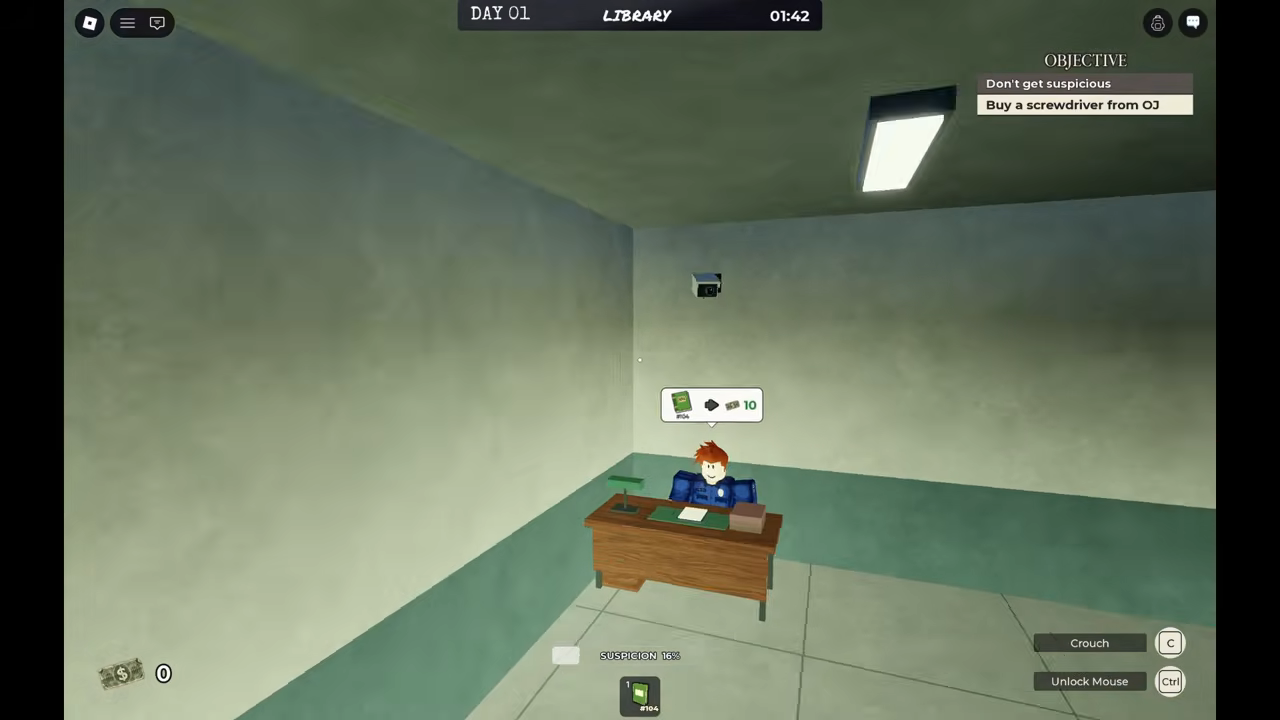
The middle part answers the phase question. Because the HUD names the schedule block, you can read the phase from the label rather than trying to judge it from how dark the scene is or from the clock alone. YARD TIME and RECREATION TIME are daytime blocks, and the tool purchases described below happened during them. The schedule names you will see include LIBRARY, LOCKDOWN, RECREATION TIME, YARD TIME and lunch.
The first part is the day counter, and it counts days across the run. When one play day ends, the screen goes black and the next day’s number is typed out, as with “Day 2” before the second day begins. A change in the day number, backed by that black screen, is your confirmation that a new play day has started.
What Each HUD Element Tells You
Most of the rest of the HUD supports the routine rather than the phase. It is easy to mistake the objective panel or the meters for a day/night indicator, so it helps to separate what each readout actually does.
HUD readouts in 13 Days to Escape
- HUD element
- Day, block and clock line
- Where it is
- Top centre
- What it shows
- Day number, schedule block and clock, for example DAY 02 YARD TIME 00:04
- Tells you the phase?
- Yes — the block name is the phase
- HUD element
- Objective panel
- Where it is
- Top right
- What it shows
- The Don’t get suspicious warning plus the current task
- Tells you the phase?
- No — it tracks your task
- HUD element
- Cash counter
- Where it is
- Bottom left
- What it shows
- Your current cash
- Tells you the phase?
- No
- HUD element
- Suspicion meter
- Where it is
- Bottom centre
- What it shows
- Your current suspicion level
- Tells you the phase?
- No
- HUD element
- Hotbar
- Where it is
- Four slots
- What it shows
- Item durability, such as 202/500
- Tells you the phase?
- No
The objective panel deserves its own note, because it changes as you play and can look like a progress clock. Its tasks run in order: Buy a screwdriver from OJ, then Unscrew the toilet, then Make your escape. The Don’t get suspicious warning stays at the top of the panel throughout. That is a to-do list tied to your progress, not a phase readout.
What Changes Between Day and Night
The official description sets the split out in two lines: “Act normal by day. Plan your escape by night.” Most of what follows about the two halves comes back to that sentence. Day is the cover story, the routine that keeps you unremarkable. Night is when the escape and the game’s darker premise take over.
Day and night in 13 Days to Escape
| What changes | Day | Night |
|---|---|---|
| The game’s wording | Act normal by day. | Plan your escape by night. |
| Main focus | Roll call, prison jobs for cash, buying tools from OJ’s Deals | Hiding tools, moving the toilet, digging out, exploring dark tunnels |
| What to stay clear of | Guards and CCTV, and letting suspicion rise | Being taken behind the STAFF ONLY door — escape before it is your turn |
| What signals it | A schedule block named on the HUD, such as YARD TIME or RECREATION TIME | Lights out, the moment the game description ties to the strange events |
Daytime: Keep Up the Routine
The official description lists the daytime activities directly: roll call, working prison jobs to earn cash, buying tools from OJ’s Deals, avoiding guards and CCTV, and keeping suspicion low. The prison routine page follows those schedule blocks in more detail, while the stealth guide and suspicion guide expand on the two warnings the description gives you.
OJ is the orange-jumpsuit NPC at cell 13, and pressing E opens “OJ’s DEALS”. The observed prices were 110 cash for a Saw during YARD TIME and 25 cash for a Screwdriver during RECREATION TIME, and buying the screwdriver changed the objective to “Unscrew the toilet”. Both purchases sat inside daytime schedule blocks, which matches the description placing tool buying among the day’s activities.
None of that changes the phase name. The day half is where you build cash, tools and a low profile, and the cash, suspicion and hotbar readouts are how you keep track of that work. When the next block starts, the top-centre line names it, and that name is what you read for the phase.
Night: Plan the Escape
The other half of the description is less about errands: “Something strange happens after lights out. Prisoners are taken behind the STAFF ONLY door... and they don’t come back the same. Escape before it’s your turn.” That is the reason the game tells you to plan your escape by night, and the reason the daytime routine works as cover.
The escape actions named in the description belong on this side of the split: hiding your tools, moving the toilet, digging your way out and exploring dark tunnels. The day list — jobs, cash, OJ’s Deals, guards, CCTV, suspicion — is what makes those actions possible without drawing attention. The STAFF ONLY door is the part of the night premise the description dangles in front of you.
It helps to keep the two kinds of information straight. The HUD names the schedule block you are in; the description puts the strange events after lights out. Read the top-centre line to know which block is active, and treat lights out as the cue the description gives for the night side of the game.
Tracking the Day Counter
The front of the top-centre line counts days across the run: DAY 01, DAY 02 and so on. It advances when one play day ends, not when a schedule block changes, so it answers a different question from the block name. The block name tells you what part of the current day you are in; the day number tells you how far through the run you have reached.
The black screen with typewritten text is the hand-off between days. It read “Day 2” before the second play day began, and the next day then started from there. If you are unsure whether a new day has started, that screen and the changed day number settle it.
Exact values can vary between sessions — day numbers, block names and clock readings included — but the shape of the top-centre line stays the same: day number first, block name in the middle, clock last.
When you are ready to act on the night half, the escape plan page follows the route further, and the full walkthrough covers a complete run.
Related Guides
Daily Prison Routine
Every scheduled block from wake-up to lights out, what each alert means, and what you must do in it.
Your Escape Plan
Order every day task, tool purchase and night action into one plan from wake-up to tunnel entry.
Keep Suspicion Low
What raises suspicion, what settles it back down, and the habits that keep your escape hidden.